Wednesday, August 1, 2012

HTML5 Banner Using Adobe Edge

HTML5 Banner Using Adobe Edge:
Now a days, RIA developers having high expectations from the new tool introduced by Adobe with the named ‘Adobe Edge’, for RIA interactive applications. Some people even say that the new change or trend in HTML5 can compete with great RIA tool like Adobe Flash. As I understand, Flash capabilities are more powerful and more extendable then the current versions of HTML5. At the moment, I don’t see any competition between Flash and HTML5. I think both will have their own place in the market.
Adobe Edge is new promising tool that provides an environment to create HTML5 animations through a timeline (something like flash timeline) and interface using interactive methods and functionalities. It can makes HTML5 animations very easy for designers who do not have experience with coding, and allows them to create HTML5 animation without writing a single line of code.
In this post, I would like to show you how to create a simple HTML5 banner animation using Adobe Edge. Before staring the tutorial, you can download Adobe Edge latest from Adobe Labs.
Assuming that you have some basic idea about animations with Adobe’s other tools.
Step 1
Let’s start by opening Adobe Edge. Open New File from File menu. Set document width and height properties from Properties panel on left side. Here set Width to 600 px and Height to 200 px. Also you can set title of the document from the Properties panel.
AdobeEdge
Step 2
Now from the Properties panel, open the background color picker and set the background color. And set the Overflow to Hidden to hide the objects that are off screen and also you can set Autoplay options.
AdobeEdge
Step 3
Choose Import from the File menu and open Edge icon type image and place it in the banner as shown below and set the Edge icon image Width to 180 px and Height to 160 px.
AdobeEdge
Step 4
Use Text tool, type “Adobe Edge” and set dimension and font size of the text area.
Step 5
Now you will animate the Adobe Edge icon and text through the timeline. The timeline in Adobe Edge is similar to other Adobe applications, such as After Effects. When you create an object on the stage you will find that a separate layer is created for it in the timeline. Each layer has sub layer that includes the properties of each layer. In order to create the animation, we will need to create keyframes that represent the change in layers content properties like position. As shown in below screen you can change the translate X and Y position of object.
Now the time line indicator positioned at the beginning of the timeline, move the Adobe Edge icon image to top of the stage and moves the timeline indicator by a few frames and drag the Adobe Edge icon image to its final position in the stage. Apply same thing with text object. Also you will get the animation area of object by different color.
There is an interesting panel known as Elements Panel. It simultaneously servers two purpose. It exposes the document’s DOM and acts as a Library for the items or objects used in your application. The order in which elements appears in this panel is the order in which they appear in the timeline. If you move a timeline layer up or down in the layering order, that change is instantly reflected the Elements panel and vice versa.
AdobeEdge
AdobeEdge
Step 6
Save the file and you can preview it in browser by selecting “Preview in Browser” from File menu.
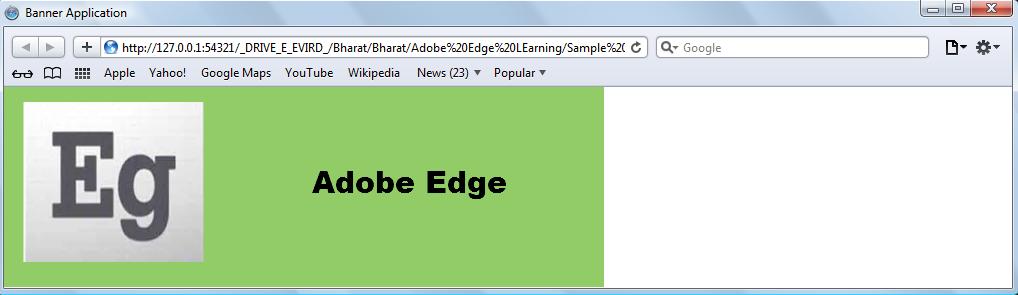
AdobeEdge
In this post just show how to create a simple HTML5 animation using Adobe Edge. I think the tool is very simple, it would be helpful for creating animation, especially because in HTML5, it would be more complex to create animation using manual coding.
You will get a quick overview of the output folder from below screen. It contains the Adobe Edge included JavaScript files in “edge_includes” folder, application related JavaScript files and “images” folder contains assets used in the application.
AdobeEdge

Object-oriented JavaScript

Object-oriented JavaScript:
JavaScript is a prototype-based scripting language that is dynamic, weakly typed and has great functions. It is a multi-paradigm language, supporting object-oriented, interactive and functional programming style. JavaScript is the most popular scripting language on the internet, and works in all major browsers, such as Internet Explorer, Firefox, Chrome, Opera, and Safari. As its scripting language so it’s lightweight programming language. It’s usually embedded directly into HTML pages. And it is an interpreted language means that scripts execute without preliminary compilation.
JavaScript was formalized in the ECMAScript language standard and is primarily used in the form of client-side JavaScript, implemented as part of a Web Browser in order to provide enhanced user interfaces. This enables programmatic access to computational objects within environment. JavaScript uses syntax influenced by that of C. It also has many names and naming conventions from Java. JavaScript and Java are different language. Java is frequently used to program games, mobile phones and other devices and also for websites. JavaScript is powerful language that runs inside a web browser. Its role is to provide access to different elements of the pages so that they can be removed or updated. For example, it can send request to Web Server to get more information and update specific part of page without reload the page.
And JavaScript perform such task by accessing the Document Object Model (DOM), a model or structure similar to a family tree. JavaScript is an event-driven language. There are some events triggered automatically like load event and there are some event triggered by user interaction like click, tap on touch-sensitive screen or mouseover and mouseout.
You will get more information about JavaScript from here.
Constructor Functions
In JavaScript syntax, a constructor function represents the class that contains the template from which new object instances are created. Constructor functions create and initialize (set the default state of) properties in the new objects. The difference between a constructor function and a method function is that a constructor function uses the special this keyword to represent a reference to the new object that is being initialized. A method function typically only performs some action on a given set of an object’s data.
The following example illustrates one way to create a Rectangle constructor function that could be used to initialize the height and width of new Rectangle objects:
function Rectangle(w, h) {

this.width = w;

this.height = h;

}
You can also create a constructor function by using function literal syntax. Function literal syntax provides the same functionality as the syntax used previously and is merely an alternative way to write the constructor.
Rectangle = function(w, h) {

this.width = w;

this.height = h;

}
Instance variables
Instance variables are any variables (properties) that are defined in a constructor function and are copied into each object instance of that constructor. All object instances have their own copies of instance variables. This means that if there are five object instances of a Circle class, there are five copies of each instance variable defined in the class. Because each object instance has its own copy of an instance variable, each object instance can assign a unique value to an instance variable without modifying the values of other copies of the instance variable. You can access instance variables directly from their containing object instances.
The following example defines four instance variables—make, model, color, and speed—in a constructor function. These four instance variables are available directly from all object instances of the Car constructor:
function Car(make, model, color) {

// define a Car class

this.make = make;

this.model = model;

this.color = color;

this.speed = 0;

}
The following object instance objCar contains all four instance variables. Although a value for the instance variable speed is not passed to the Car constructor, objCar still has a speed property whose initial value is 0 because the speed variable is defined in the Car constructor.
// objCar.make = "Subaru"

// objCar.model = "Forester",

// objCar.color = "silver"

// objCar.speed = 0

var objCar = new Car("Subaru", "Forester", "silver");
Instance methods
Instance methods are any methods that are accessible using an object instance. Object instances do not have their own copies of instance methods. Instead, instance methods are first defined as functions, and then properties of the constructor function’s prototype object are set to the function values. Instance methods use the keyword this in the body of the defining constructor function to refer to the object instance they are operating on. Although a given object instance does not have a copy of an instance method, you still access instance methods directly from their associated object instances.
// increase the speed of a Car

function Car_increaseSpeed(x) {

this.speed += x;

return this.speed;

}

Car.prototype.increaseSpeed = Car_increaseSpeed;
The following example defines a function named Car_increaseSpeed(). The function name is then assigned to theincreaseSpeed property of the Car class’s prototype object:
var objCar = new Car("Subaru", "Forester", "silver");

var newSpeed = objCar.increaseSpeed(50);
You can also create an instance method by using function literal syntax. Using function literal syntax eliminates the need to define a function and the need to assign a property name to the function name. The following example uses function literal syntax to define an increaseSpeed() method that contains the same functionality as the increaseSpeed() function defined previously:
// increase the speed of a Car

Car.prototype.increaseSpeed = function(x) {

this.speed += x;

return this.speed;

}
You will get more interesting information about OOP with JavaScript from the video tutorial give below:
JavaScript tutorial
Friends, lets share your ideas :)